Background
In any long-running application, we almost always need global singletons — for example, a logger or a db instance — so that we can reuse them across different modules and functions. Next.js should behave the same way.
So I wrote a simple /lib/logger.ts module, simplified as follows:
class Logger {
  constructor() {
    console.log(`pid:${process.pid} Logger initialized`);
  }
}

// module-level variable
export const logger = new Logger();
Normally, in Node.js (or Python), module-level statements and variables are only executed once, regardless of how many times you import the module elsewhere. (In PHP you’d have to use require_once.)
That means if we import { logger } from "lib/logger" anywhere in our app, logger should be a true singleton. Its constructor should run exactly once, and the console message should print once.
But in Next.js, something unexpected happens: this module is loaded twice. The supposedly singleton logger is instantiated twice, and the constructor’s console.log appears twice — even in production mode (next build && next start), where hot reload noise is not a factor.
To investigate, I added some tracing code:
/**
 * Why this global module-level logger instance initialized twice in Next.js?
 * Even when running in production mode.
 */
console.log('[TRACE] module initialization:', __filename, 'pid:', process.pid);
console.trace();
From the stack traces, the picture became clearer:
- One initialization is triggered by
next-server.js, the entry point of the Next.js framework. - The other comes from
webpack-runtime.js.
Both happen within the same PID — so the same Node.js process — but the “webpack runtime” has its own independent module loader, separate from Node’s native one.
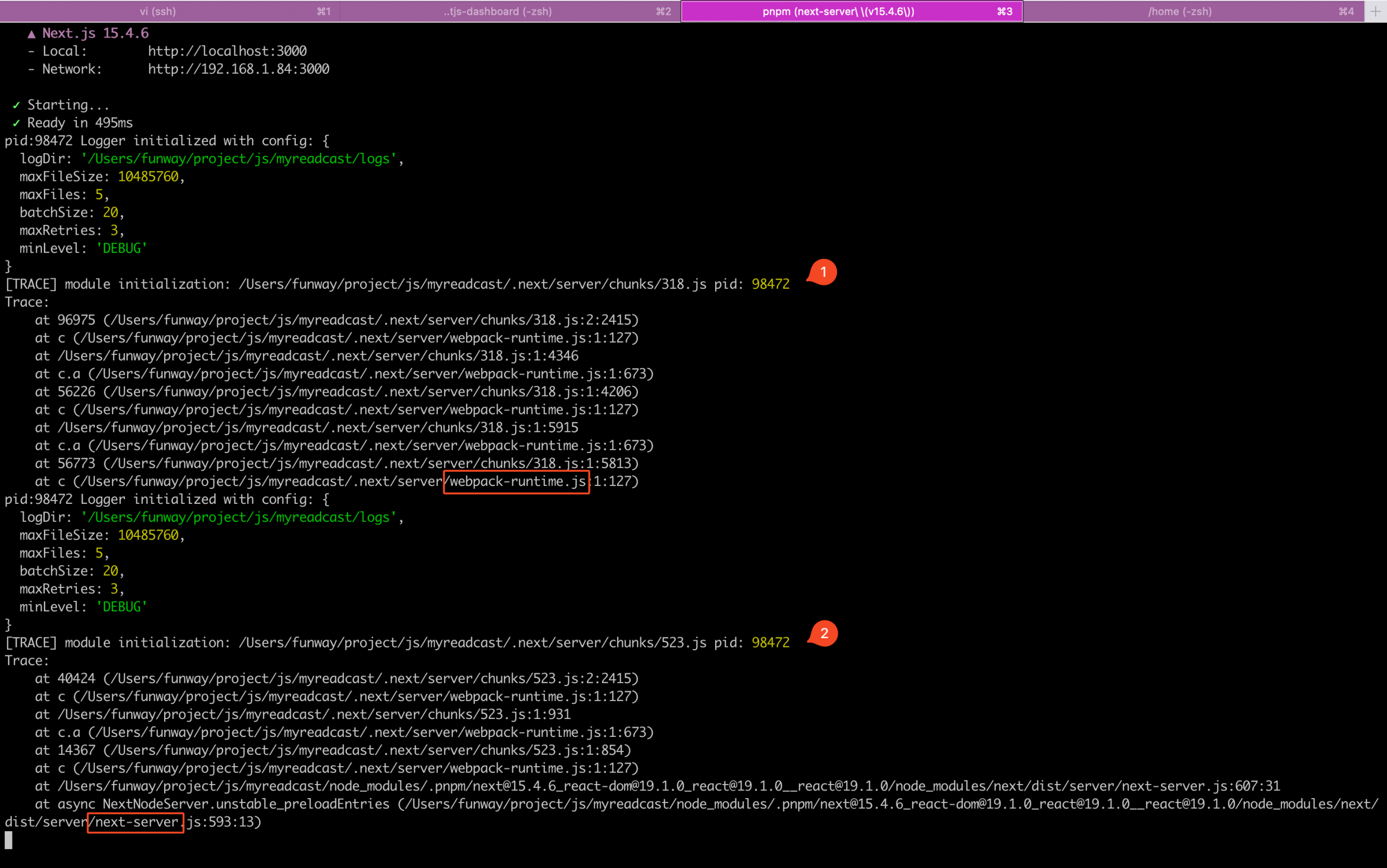
我无法深究,js 的生态太多黑魔法跟黑盒了,看得让人恶心。我只是结合 GPT 确认了大概。
- webpack 的主要工作是打包开发时候写的多个组件代码成 bundle.js 或者是 chunks/xxx.js 供客户端浏览器使用,所以你会在浏览器中看见一个 webpack-xxx.js,它负责在客户端解决不同组件 js 的依赖。由于浏览器的 client runtime 不支持 require 的,所以 webpack 必须实现自己的 module loader。
- 对于 Next.js 来说,它所谓的 SSR 也需要由 webpack 负责管理依赖关系, URL 映射等,所以在服务端就多出了一个 webpack-runtime.js。而这个 webpack 也是基于自己的 module loader 来加载模块,独立于 Nodejs runtime (next-server.js)。这就是为什么在 Next.js 的服务端,会出现两次加载同一个模块的现象。
Why Does This Happen? A module be loaded twice!
Webpack’s main job is bundling: it takes our components and dependencies and produces bundle.js or chunks/xxx.js for the browser. In the client runtime (the browser), webpack must implement its own module loader, because browsers don’t have require.
However, Next.js also uses webpack’s runtime on the server for SSR. That means the server process ends up with two parallel module systems:
- Node.js’ built-in module loader (
next-server.js) - Webpack’s simulated module loader (
webpack-runtime.js)
And that’s why our supposedly singleton module gets loaded twice.
Solution: Use globalThis
The fix is to anchor your singleton on globalThis. That way, even if the module is imported through different runtimes (the webpack-runtime isn’t truly an independent runtime), you always reuse the same global object:
// ❌ Do not rely on module-level instantiation
// export const logger = new Logger();

// ✅ Use globalThis to enforce singleton
const globalForLogger = globalThis as typeof globalThis & { __logger?: Logger };
if (!globalForLogger.__logger) {
  globalForLogger.__logger = new Logger();
  console.log('Gloabl logger initialized');
}
export const logger = globalForLogger.__logger!;
Now, no matter how many times /lib/logger.ts is imported, only one Logger will exist.
Runtime Hell in Next.js
When working with Next.js you’re not dealing with one single JavaScript environment — you’re juggling several runtimes that have different capabilities, constraints and module-loading rules. ( What the hell, why do they always make simple things complicated 🤢.)
Server Runtime (Node.js runtime)
- Where it runs: the traditional Node.js process that runs your server code (e.g. serverless functions / server components when Node runtime is chosen).
- Available APIs: full Node.js API surface —
fs,child_process,process, nativecrypto, most npm packages that rely on Node internals.
(Fake) “webpack runtime” (server-side module loader)
- What it is: not a separate OS process — webpack injects its own module loader into bundles (the “webpack runtime”) so that chunks can be resolved inside the bundle. When Next.js builds server bundles, webpack’s runtime may appear in server stack traces and can evaluate module code independently of Node’s native
requireloader. - Why it matters: the webpack loader can cause the same module code to be evaluated in more than one “module system” within the same PID (Node’s loader vs webpack’s loader), which explains duplicate initializations. Next.js’ bundling also runs webpack hooks multiple times for different targets (server/edge/client).
Edge Runtime (lightweight, V8 isolate style)
- Where it runs: On Edge infrastructure (like Vercel, Cloudflare, etc.) in a restricted, V8 Isolate-based environment.
- Available APIs: a subset of web & Node-like APIs (Web Request/Response, streaming APIs). Many Node.js APIs are not available (like
fs,path,crypto). - What runs on the Edge Runtime: API routes with
export const runtime = 'edge'andmiddleware.ts(before Next.js v15.5), must be Edge-compatible. - Build output:
next buildcreates ES module bundles under.next/server/edge.
Client Runtime (the browser)
- Where it runs: the user’s browser.
- Available APIs: DOM,
window,document, browser Web APIs, service workers, etc. Not Node.js APIs.